Release 1.0.0-beta.3 - Charon
Why Charon? - Charon the first discovered moon of Pluto. Valoon to the moon 🚀
Table of Contents
Bot
Rework
This version of Valoon is using an all new Bot. The goal is to be more efficient and improve usability. Using a proxy pattern, the conversation logic is now centralized into one component with messenger-specific services sending and receiving messages. Using this pattern it was possible to now include more messengers into Valoon.
The bots capabilities have not changed except some minor improvements. Those minor improvements will be discussed in the following.
Templates
Unified Templates
To reduce mental workload on the user, all messages follow the same principle. The messages consistently contain a title, starting with an emoji and a main section with a more descriptive text. Some can contain a footer and buttons if additional information or actions are needed.
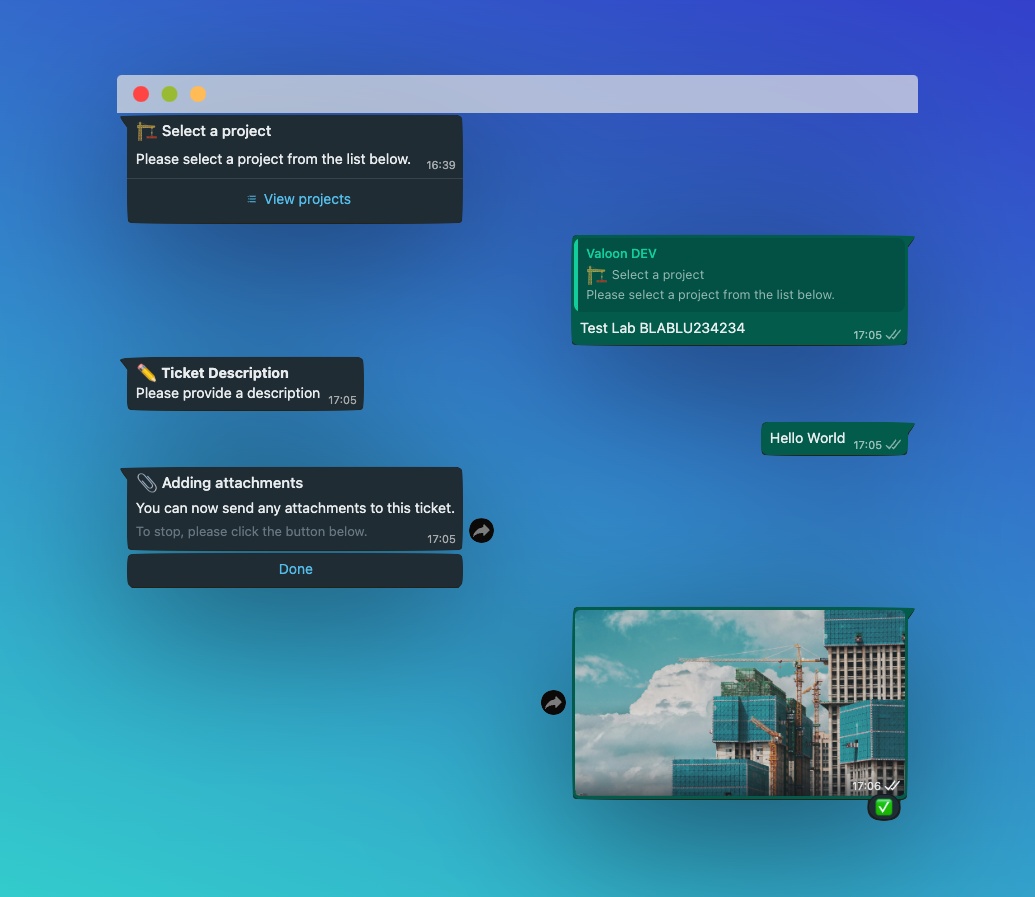
Meta Templates
Templates registered at Meta will now be created and updated automatically. The Templates are defined the same way as normal messages and will be parsed into Meta-templates befor uploading to Meta.
Template Translation
All templates can now be translated using Azure Congnitive translate. A developer can choose to update all or a single template by selecting a source language and one, multiple or all target languages.
Media
Media Types
All Media Types are now supported by the Bot.
Media Upload Status
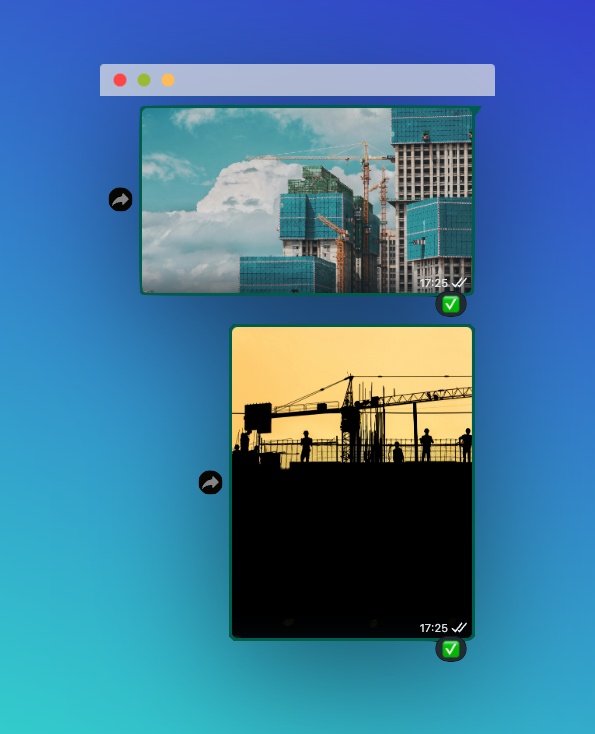
The bot gives the user feedback on media upload now. This is achieved with emojis using ⏳, ❌ and ✅.

Multi-Media Upload
It is now possible to upload multiple media at a time, the bot will handle them as one message containing multiple media files.
API
This release in the API includes several significant enhancements and new features designed to improve functionality, security, and overall user experience. Many of the changes are related to the bigger user-faced features.
New Features
Authorization Middleware
Fine-tuned access control: Enhanced entity-level access control, providing more granular permissions and ensuring secure data handling across the API.
const authorizationFunctions = {
  activities: authorizeActivity,
  companies: authorizeCompany,
  messages: authorizeMessage,
  projects: authorizeProject,
  tickets: authorizeTicket,
  users: authorizeUser,
  notifications: authorizeNotification,
  // ... other mappings
};
There are two properties that are mainly used in the authorization-handlers:
ACCESS_TYPESwhich areREADon["get", "head", "options"]WRITEon["put", "patch", "post", "delete"]
USER_ACCESS_RIGHTSwhich areOS_USERbasic read access for os users (including magic-token)SERVICEservice-bound read/write for bot (service-principal / admin like access for internal services)PRINCIPALuser-bound read/write for bot (service access but as principal for a user)MNGT_USERmanagement user access (mostly UI)
Magic-Link Token Capabilities
Seamless authentication: Introduce magic-link token capabilities, offering a secure and user-friendly way to authenticate the OS-urls in Whatsapp.
The new endpoint at /users/{userId}/token can be used to generate tokens that can be included in OS URLs to become magic authentication URLs. The tokens are user specific and will be deleted from the DB after 7 days (using expiresAt). The tokens are returned to the endpoint on request, but only the hash values are stored in the DB. The endpoint is accessible for internal services only.
Service Principals through Azure AD
Service principals with Azure AD: Support for service principals, allowing the Bot service-level-access to the API.
The bot now has its own service-principal in Azure AD. The token is set via github secrets on the infrastructure repo. The app registration can be found at this clientId: 702e9abb-0ef5-4dee-bbf3-506c362bb2f9 and will expire at 3/4/2026.
Categories for Tickets
Improved ticket organization: Addition of categories to tickets, allowing for better structuring and easier navigation of ticket issues.
Notification Service
Real-time alerts: A new notification service to keep users informed about critical updates, events, and actions required.
Enhancements
Smaller Features
- OS-visibility in project contacts: For GDPR reasons we restricted the default contacts view to mngt users only
- New comments: Introduction of new templates for comments with new translated text
- New Mongoose features: Implementation of
countDocumentsfor more efficient document counting - Search endpoint: Search endpoint "light" using Mongos full-text-search capabilities
- Ticket media: Endpoint for ticket media in a project
- Invite and merge: New endpoints for
/users/{userId}/connectand/users/{userId}/wa-invitefor the messenger connection process (also there is a new way of doing this coming from API and bot)
Model and Property Updates
- New project assignments modeling in user property: Changed the user model to differentiate between owner, participant and pending
- Other model updates: Project settings, bot settings in company, company and companyValoon
- Various minor features and improvements that support and enhance the larger updates on the bot and UI fronts
UI
This release introduces several significant updates to the user interface, aimed at improving usability and enhancing the overall user experience. The updates include the addition of categories for tickets, a new notifications center, and the ability to export from .docx templates and more minor UI/UX enhancements.
New Features
Categories for Tickets
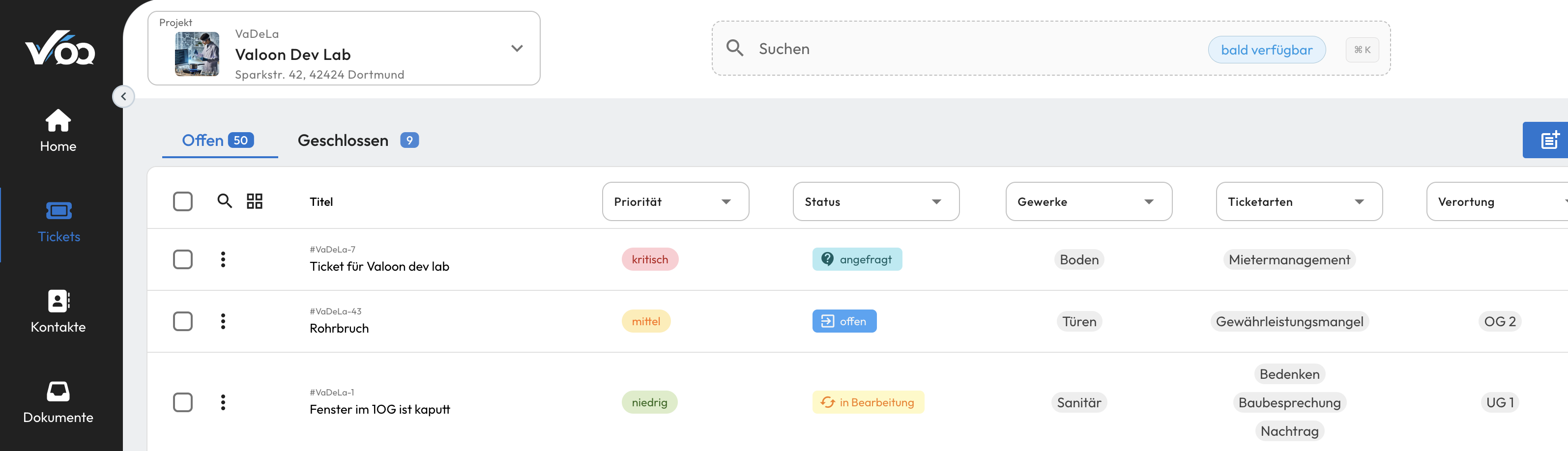
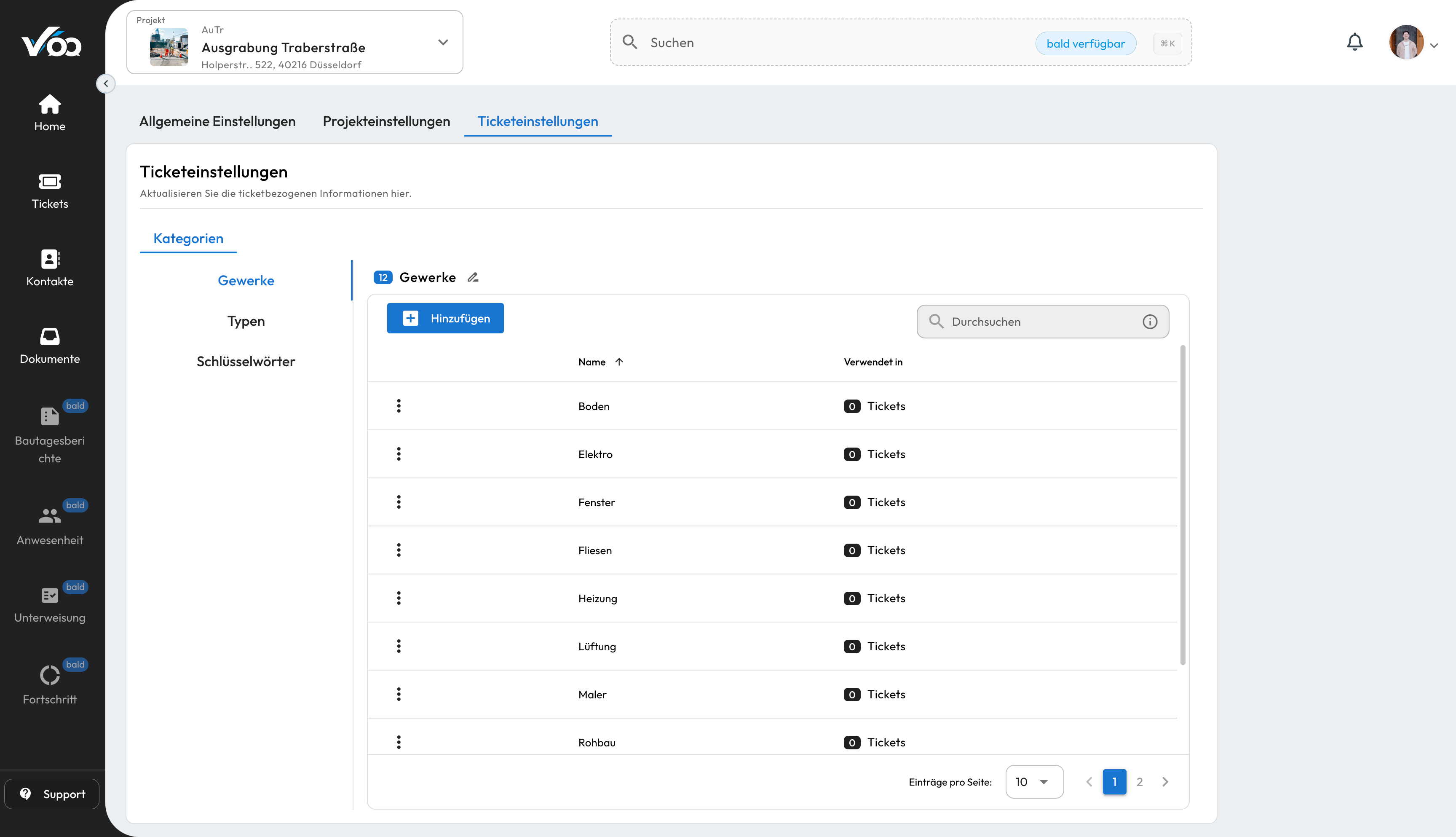
To improve ticket organization and navigation, we've introduced categories for tickets. Now, when creating or editing a ticket, you can assign it to a specific category. This feature allows for better structuring and easier navigation of ticket issues, making it simpler to manage and track tickets.
Key Features:
-
Create Categories:
- Users can use 3 of the predefined categories and customize them tailored to their needs
- Categories can be defined with unique names
-
Assign Categories to Tickets:
- When creating or editing a ticket, users can select one or multiple categories to associate with the ticket
-
Filtering and Searching:
- The ability to filter tickets based on categories
- Search functionality enhanced to include category filters for quick access to specific types of tickets
Notifications Center
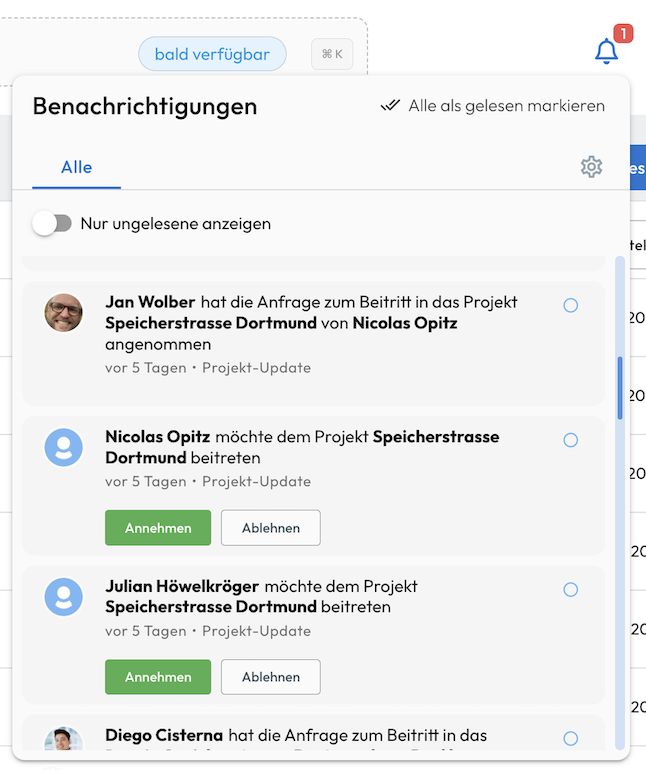
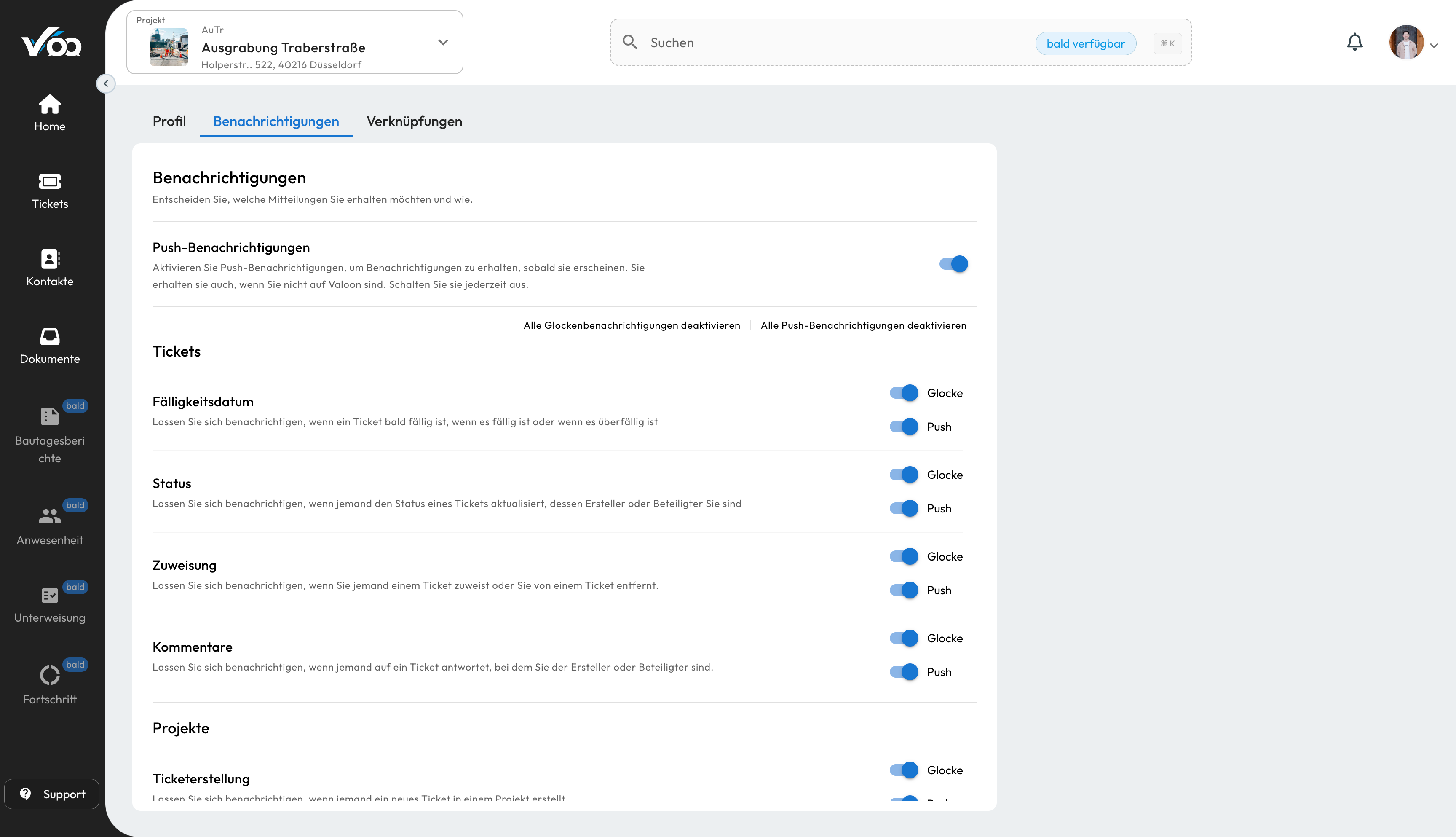
Keeping users informed about updates, events, and actions required is crucial. To this end, we've introduced a new notifications center. The notifications center is a centralized hub for users to view notifications that provides real-time alerts and updates, ensuring that you never miss important information. It consolidates all relevant notifications, such as new ticket assignments, updates, reminders, in one accessible location. You can access the notifications center from the main navigation bar.
Key Features:
-
Unified Notification Feed:
- All notifications gathered in a single feed
- Notifications sorted by relevance and time for easy prioritization.
-
Real-time Updates:
- Instant notifications for new ticket assignments, replies, status changes and more
- Users stay informed about critical activities without the need for manual checks
-
Customization Options:
- Choose notification types and delivery methods (in-app, push).
-
Actionable Notifications:
- Take immediate actions directly from the notification center without leaving the interface
Export from .docx Templates
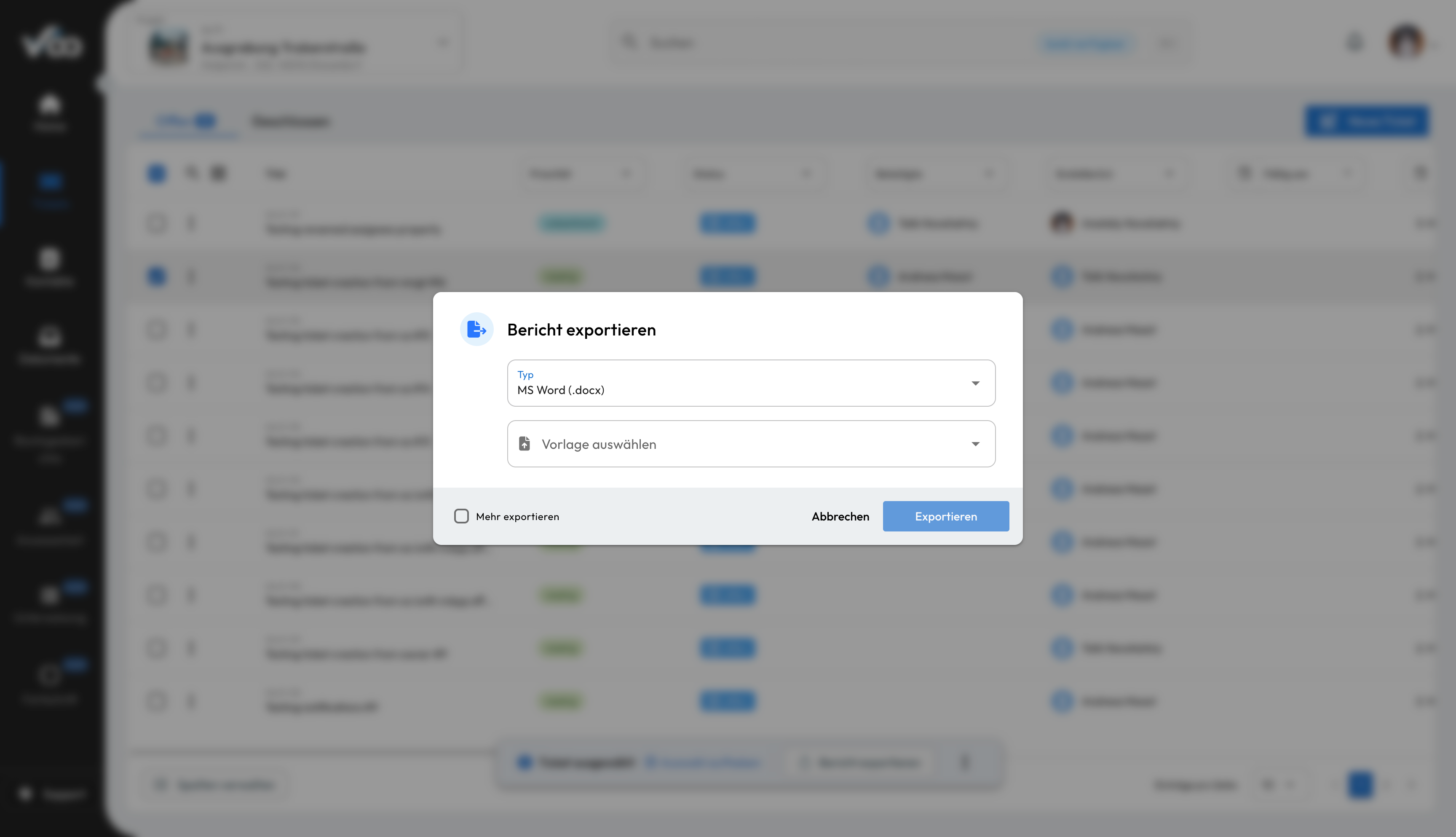
In addition to the existing export options, we've added the ability to export from .docx templates. This feature allows you to create reports in the familiar .docx format using our default or your own templates. To use this feature, simply select the .docx option when choosing your export format.
Enhancements
Smaller UI/UX Features
- Tickets:
- The columns of the ticket table can be customized. Everyone can decide which columns to display and in which order
- Both the ticket details view and the ticket creation window now have a new look and feel
- Contacts:
- If the contact has multiple messengers, you can now choose which messenger to use to write to them
- Settings:
- General, project and ticket settings are now all in one place
- Media Viewer:
- media viewer component has been redesigned to display all avatars uniformly, to display images in the gallery if there are multiple images, and to be generally faster
Concluding words
These updates are part of our ongoing commitment to improving the user experience and providing our customers with the tools they need to work efficiently and effectively.